Context
The process described here was part of a short project where the client needed my opinion to design the flight status tracker feature for their new flights booking app.
The deliverables turn around was two days with only a few minutes with the key stakeholders and the primary user of the app.
My role
UX Researcher / Designer: creation of UX artefacts to support my design rationale as well to communicate my findings with stakeholders and product managers.
Brief
Design the main screen for a mobile app where a user can track the status of a flight.
User
Personal Assistant who organises travel plans for multiple executives at a large corporation.
Constraints
- Mobile app
- Single user
- Quick turn around
Research and design process
I followed a non-linear approach and used a combination of the Double Diamond process and the Design Thinking process.
I created different artefacts to support my research and explore possible solutions which are described in the following slides.
Discover/Research
1. Understanding the user
Short Q&A exercise:
Q: What is your role?
A: I am a Personal Assistant who organises travel plans for multiple executives at a large corporation.
Q: Is this part of an existing feature of a product that you want to improve or will this be a new product altogether?
A: A new product
Q: What kind of information would you like to see here and what do you want to get out of it?
A: Seeing I have to manage the schedule of multiple executives, times are very important as well as any delays/cancellations so I can manage other arrangements accordingly. I also need to ensure my travellers are safe at all times including during emergencies such as severe weather or security events around the world.
Q: Why do you need an app and why this product/feature need to exist?
A: As someone who manages the diary of other people it’s important for me to know whether they will be on time/delayed so I can make alternate arrangements if required and communicate to other parties accordingly.
Q: What tools did you use to track the status of your previous flight (work/personal)?
A: I often use the airport’s website.
Q: At what point of your travel did you use these tool(s)?
A: Throughout the whole end-to-end journey (Assumption needs to be validated)
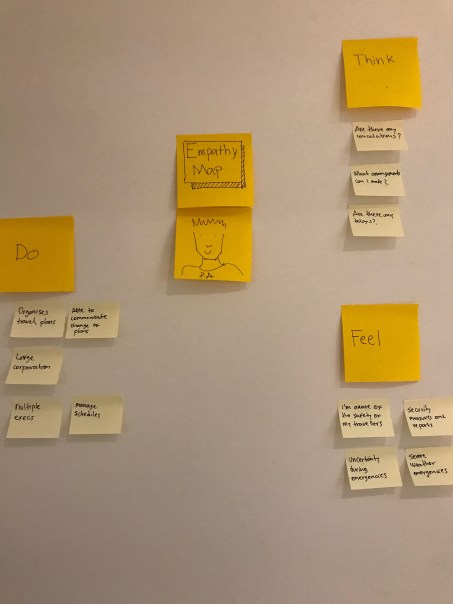
2. Empathise and finding user needs and goals
Based on the insights from the primary research an Empathy Map was created to better understand what the user does, thinks and feels in this particular context of tracking the status of a flight for his travellers.
Define/Synthesis
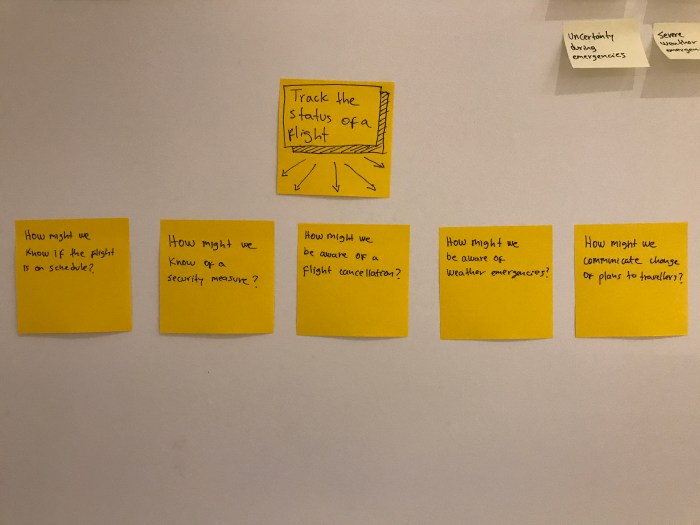
Interpret findings and analysing the original problem statement.
The Empathy Map was the base to take the original brief apart by using the ‘How Might We…’ question technique.
This way the problem statement is more specific to point at the goals the user want to achieve by performing different tasks.
Develop/Ideation
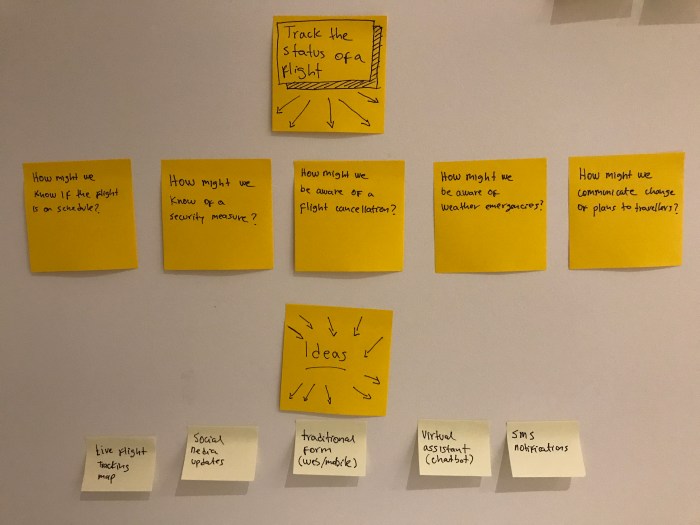
Idea generation and evaluation
The HMW questions guided the brainstorming process in an effective and productive way as each idea could point to the solution of one or more questions.
Discover/Research
1. Main steps of the user journey
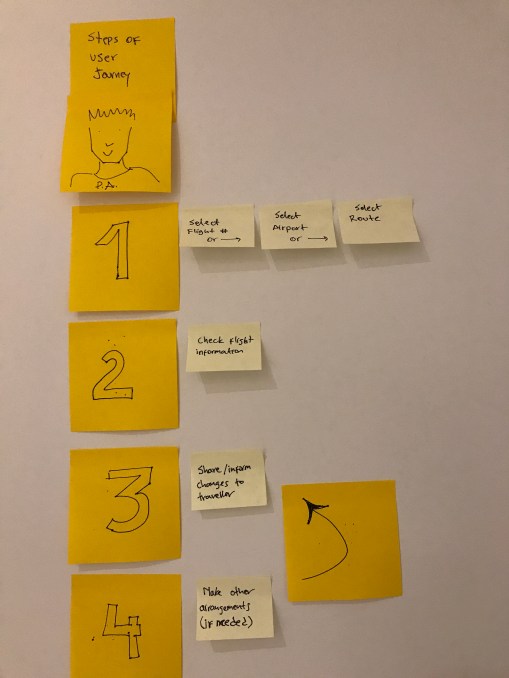
Before I went and create some sketches based on the ideas that came up from the previous exercise, I wanted to explore the user journey to better integrate these new features.
The Empathy Map also helped to clarify the main touch points the user follows in order to achieve his goals. A quick user journey map was created to visualise this.
2. Competitor analysis
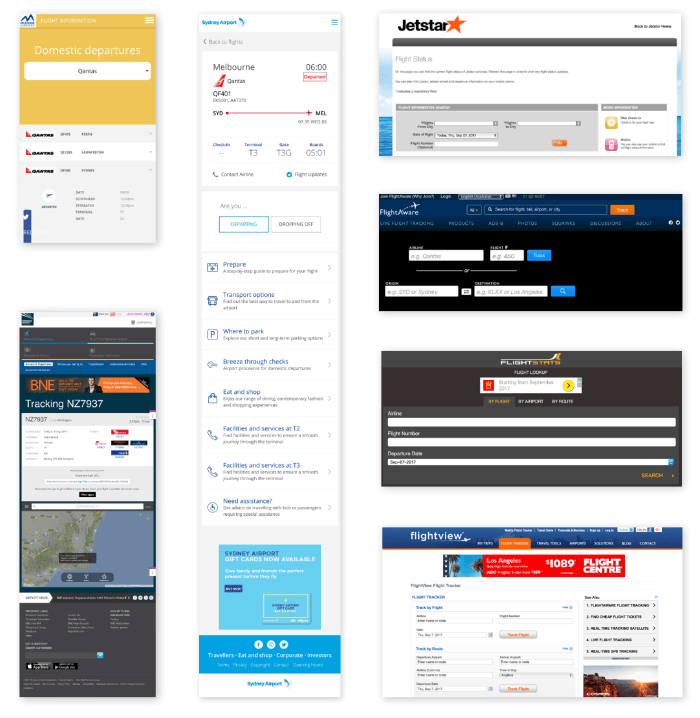
From the primary research, the user stated that he also uses the airport’s website to check the status of a flight.
This was a clear indication for me to investigate how different websites communicate this kind of information to get a better understanding of how to implement our own features in the product we are building.
Deliver/Implementation
Paper sketches
Information required:
- Flight number
- Flight times
- Airline name
- Origin and destination
- Security and weather warnings
- Other info: car hire, accommodation, transport
Following the main steps of the user journey and considering what information is needed, these two sketches were created.
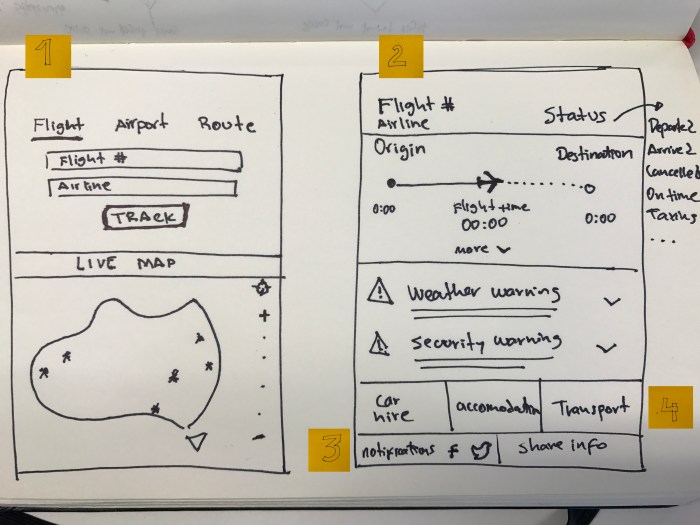
1. Select:
There will be four ways to select a flight:
- Flight details
- Airport
- Route
- Live map
2. Check information
3. Share updates:
Receive notifications via social media and share info with traveller.
4. Make other arrangements:
- Car hire
- Accommodation
- Trasport
Next steps
Due to time constraints, the design process was carried out up to the build/prototype stages using a low fidelity paper prototype. The client only needed a concept so I handed over these findings to their internal design team for them to implement.
The logical next step of this part of the process –that is not included in this exercise– will be testing and analysing the insights based on feedback from the user and its relevant iterations by building a higher fidelity prototype which is up to their in-house team.
 Sebastian Amado